A Windows background tool that turns voice into typed text. Hold a hotkey, say something, release. The words appear at wherever your cursor is. No app switching, no clicks, no cloud.
One key carries three gestures. Hold it and speak, and the words are typed. Hold Ctrl with it and it answers out loud instead. Tap Shift with it and it cleans whatever is on your clipboard.
The Problem
Windows dictation is broken for power users. Windows Voice Typing requires manual activation for every session and doesn’t work universally across apps. Dragon NaturallySpeaking costs hundreds per year and sends your audio to the cloud. Other Whisper-based desktop tools still require interaction: open a window, click record, click stop, copy the text, switch back, paste. Five steps for something that should be zero.
The goal was zero steps: hold, speak, release, text appears.
How It Works
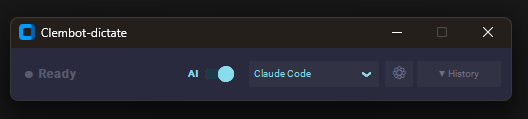
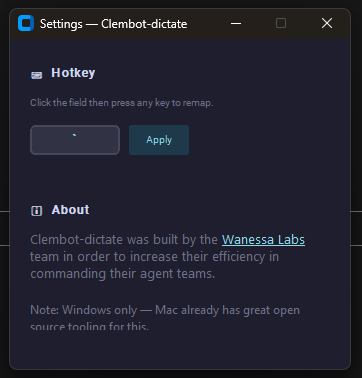
Clembot-dictate runs silently as a background process with a 44px header strip at the top of the screen. When you hold the configured hotkey (default: backtick), it starts capturing mic audio into an in-memory numpy buffer. On release, it passes the buffer directly to faster-whisper for local transcription, then routes the output through an optional AI refinement pass before pasting to the active window via pyperclip and a synthesized Ctrl+V.
The entire pipeline runs off the main thread. The hotkey listener never blocks.
hold hotkey → window_detector reads active app → sample Ctrl → Recorder captures audio
→ key release
   ├─ Ctrl held → sidecar over 127.0.0.1 → route → execute → spoken answer
   └─ otherwise → Transcriber (faster-whisper, tiny model, CPU)
                → Refiner (Ollama local or Claude Haiku) → Paster (pyperclip → Ctrl+V)
                → text at cursor
End-to-end latency target: under 3 seconds on CPU with the tiny model.
AI Refinement
Raw speech is messy. The optional refinement pass shapes the transcript based on context mode:
- Claude Code mode: Converts rambling speech into clean, precise developer commands. Strips filler words, preserves technical terms, outputs as an imperative instruction.
- Work writing mode: Polishes speech into professional written communication, matching register to the context.
Modes are defined in config.py. Add your own by editing a single dict.
Auto-Context Detection
At the moment you press the hotkey, before recording starts, Clembot-dictate reads which process is in the foreground using win32gui + psutil and switches to the matching context mode automatically. Switch from VS Code to Outlook: the mode switches without touching the UI.
Dual Backend
- Local (default): Ollama + Gemma 3 4B: runs on your machine, free, no API key required. Model is warmed at startup to eliminate cold-start latency.
- Cloud: Claude Haiku: higher-quality refinement for approximately $0.001 per dictation. One config change to switch.
History Panel
Every dictation stores both the raw transcript and the AI-refined version in a scrollable history panel. Re-run AI refinement with a different mode, copy any entry to clipboard, or switch backends mid-session. The panel is hidden by default and expands from the header strip on demand.
Ask Instead of Dictate
Dictation puts words at the cursor. It cannot answer anything. Asking “what’s blocked” used to mean stopping, opening a terminal, starting a session, and reading files that a parser could read in milliseconds.
So the same gesture got a second meaning. Hold Ctrl with the hotkey, speak, release, and the audio goes to a local process that transcribes it, decides how much machinery the question deserves, executes at that level, and speaks the answer back. Nothing is pasted.
Ctrl is sampled once at key-down, so this is per utterance rather than a mode. There is nothing to toggle and nothing to forget, which matters because a mode you forget you are in pastes an answer into a document.
Clean the Clipboard
Text that comes out of a language model carries characters you cannot see: zero-width spaces, word joiners, non-breaking spaces. They are invisible where you read them and loud everywhere else, breaking search, diffs and word counts in whatever you paste them into.
Tap Shift with the hotkey and the clipboard is cleaned in place. Every dictation gets the same pass before it reaches your cursor.
Visible punctuation is left alone on purpose. Em dashes, curly quotes and ellipses are ordinary characters that ordinary writing uses, and editing your prose is a different job from removing bytes you never chose.
It is not watermark removal, and it proves nothing about authorship. Text can be marked statistically, in word choice rather than in the bytes, and nothing here touches that. What it does is narrower: what you paste stops carrying invisible characters that confuse the next tool to read it.
Not every invisible character is junk. Emoji combine with zero-width joiners, flags are built from tag sequences, and Arabic, Persian, Devanagari, Hangul and Mongolian use joiners that carry meaning. Those survive; only free-floating carriers are taken.
The clipboard has no undo, so every clean is recorded in the history panel with a tally of what changed, and one click puts the original back.
Three Tiers, Cheapest First
Most questions people ask a repository are lookups, not reasoning problems. Sending those to a model costs money, adds seconds, and lets the model be confidently wrong about a fact sitting in a file.
| Tier | What runs | Cost | Latency |
|---|---|---|---|
| Skills | An allowlisted read-only command, reimplemented in Python | $0 | 120 to 220 ms |
| Metrics | Deterministic reads of repository state files | $0 | 1 to 37 ms |
| Agent | A coding-agent CLI in read-only plan mode | $0.019 to $0.074 | 3.6 to 95 s |
The first two tiers are fully local, so the only thing that ever leaves the machine is a transcript bound for the third. Key-up to first spoken word measures about 3.2 seconds: 1.46 s to transcribe, effectively zero to route, 0.03 s to execute, 1.69 s to reach the first audio.
The measurement that set this design: running three commands through the agent CLI cost $1.0028 per utterance, because those commands are prompt files rather than scripts. The same three answers, reimplemented in Python, cost nothing and return in under a quarter of a second.
The tier is derived from the recognised intent, never reported by a model. One table maps intent to tier. An unrecognised request gets no tier at all and an honest refusal that repeats what it heard, because a display reading “tier 3” for something that never ran is worse than no display.
Two Seams That Make It Portable
Neither half assumes a particular repository or a particular AI subscription. Both assumptions were pulled out into data rather than code.
- Profile. Where the deterministic tiers get their facts. One profile reads a structured vault layout. The other reads any git repository through its log, README and TODO checkboxes. A profile also declares what it cannot answer, and those questions are routed to the agent instead of being faked.
- Backend spec. Which agent CLI answers the top tier. Adding one takes a JSON file, no Python, so the feature works with whichever coding-agent subscription you already pay for.
A backend has to prove its read-only mode took effect before its answer is accepted. That check exists because one CLI accepted a read-only flag, printed that it had overridden it, and exited 0 with an authentication error inside its payload. Accepted flags and exit codes are both worthless as evidence.
Why a Sidecar and Not a Merge
The two halves disagree about their dependencies. The answering half needs numpy>=2.0.2 for its text-to-speech; the app runs numpy 1.26.4 and ships as a 283 MB installer. Merging them meant resolving that conflict and adding 354 MB of speech models to a download most people will never point at a repository.
A loopback socket keeps both dependency trees intact and the installer the size it was. The sidecar publishes its host, port, token and process id to a user-level file; the client checks the process is alive before trusting it, so a stale file reads as “not running” rather than a hang. If the sidecar is down, a Ctrl-held utterance falls through to ordinary dictation. A missing sidecar never costs you words.
Verified across both environments: sidecar on numpy 2.5.2, client on numpy 1.26.4, spoken question answered in 2.88 seconds.
Safety
Voice is a low-friction input, which is exactly why the answering path is read-only by default. The agent tier runs in plan mode holding Read, Grep and Glob and nothing else. No writes, no commits, no pushes from a voice command.
A change to any file would need two independent things, not one: a spoken confirmation after the intent is read back, and a diff on screen. Voice confirmation supplements the diff rather than replacing it. That gate exists as an interface and nothing in this version passes through it.
Stack
| Component | Role |
|---|---|
sounddevice | Streams float32 audio from mic into numpy buffer while hotkey is held |
faster-whisper | CTranslate2-based Whisper, 4x faster than openai-whisper on CPU. Tiny model, int8 quantized. Accepts numpy array directly, no WAV file I/O |
keyboard | Global hotkey listener, suppress=True prevents raw keystroke from typing. Works system-wide without admin rights |
pyperclip + pyautogui | Saves previous clipboard, writes transcript, fires Ctrl+V, restores clipboard |
win32gui + psutil | Reads active window process name for auto-context switching |
customtkinter | Dark-themed UI on the Wanessa Labs palette: 44px frameless header strip, expandable history panel |
pystray | System tray icon, turns red while recording |
ollama | Local LLM client, Gemma 3 4B default |
anthropic | Claude API client for cloud refinement, Haiku by default |
voice_command | Stdlib-only client for the answering sidecar. Adds no dependency, so an optional feature cannot change what the installer carries |
| Kokoro (in the sidecar) | Local text-to-speech for spoken answers. The fp32 build measured 3x faster than int8 on this CPU, which has no VNNI |
Runtime: Python 3.10+, Windows 10/11.
Distribution
Ships as a Windows installer built with Inno Setup 6, no admin rights required (installs to %LOCALAPPDATA%). The faster-whisper model downloads on first launch rather than being bundled, keeping the installer under 100 MB. The build is 77.7 MB, and the voice-command feature did not change that, which is the point of keeping the answering half in its own process.
Production hardening: Single-instance mutex, crash handlers with log path dialog, rotating log file, model download progress UI, mic permission check, minimum recording gate, and VAD silence filtering.
Security: Anthropic API keys stored in Windows Credential Manager via the keyring library, not in environment variables. Optional model SHA256 integrity check after download. Auto-update version check runs at startup against a hosted JSON endpoint.
The Inno Setup uninstaller removes the startup registry entry and offers to delete history and logs from AppData.
Source and downloads: the project is open source at github.com/clemenswan/clembot-dictate, MIT licensed, with the signed-by-nobody installer attached to the latest release. The repository is a curated export rather than a mirror: the working tree it comes from holds real dictation transcripts, so what gets published is an explicit allowlist rather than everything minus a denylist.